Text Message Terms
Last updated 12 August 2026
What this covers
These terms apply to the text messages Pets Western Ltd. sends about your account. They do not cover the pet-sitting services themselves, which are governed by the service agreement signed for each booking.
How a pet owner opts in
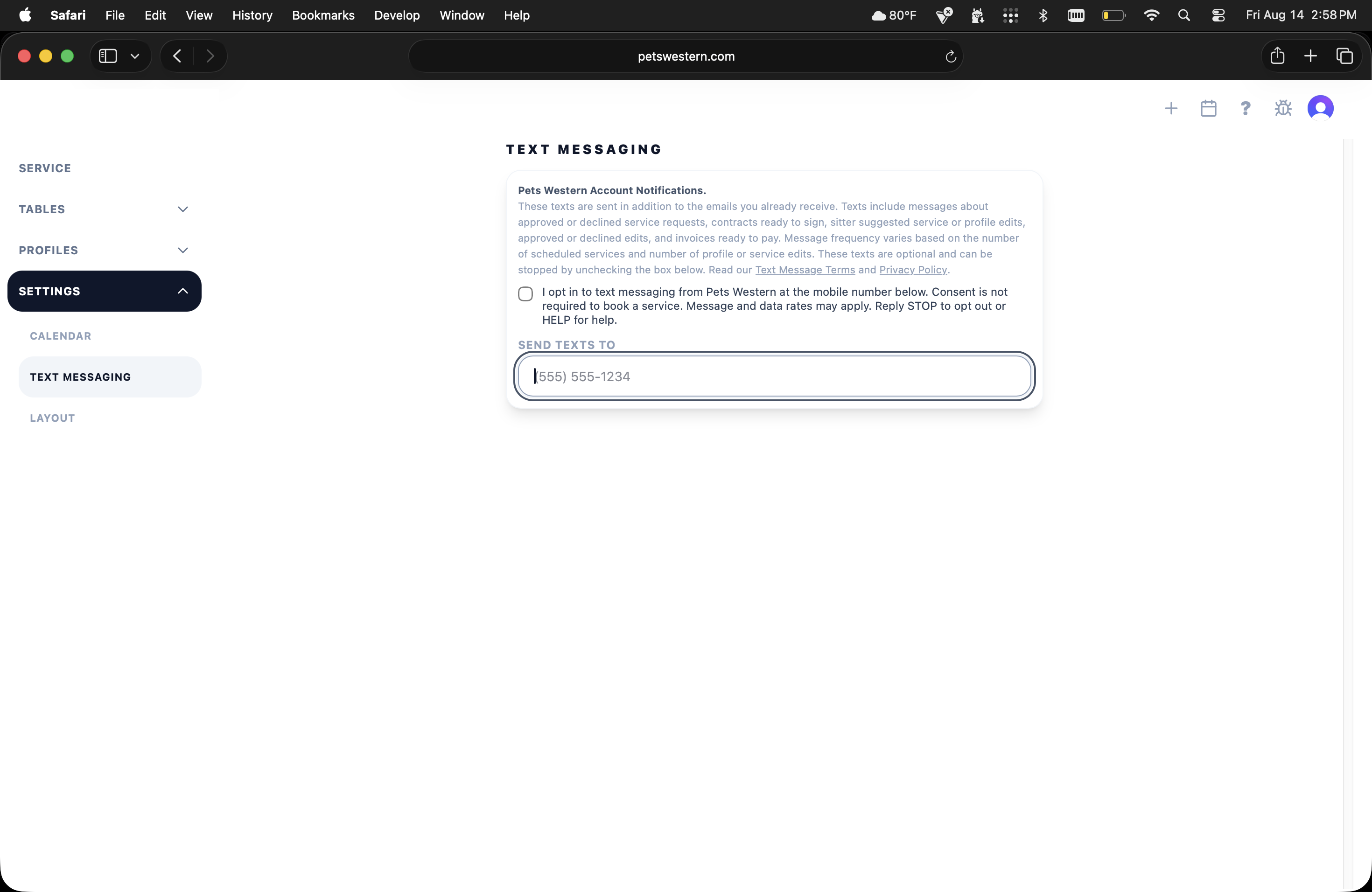
Pets Western Account Notifications. Texts include messages about approved or declined service requests, contracts ready to sign, sitter suggested service or profile edits, approved or declined edits, and invoices ready to pay.
Step 1 - Sign in at petswestern.com and open Settings, then Text Messaging.
Step 2 - Read the disclosure shown above the field, then CHECK THE OPT-IN BOX, which begins “I opt in to text messaging from Pets Western…” It is empty by default and nothing is pre-selected anywhere in the flow; checking it yourself is the consent.
Step 3 - Type your own mobile number. The field is empty by default.
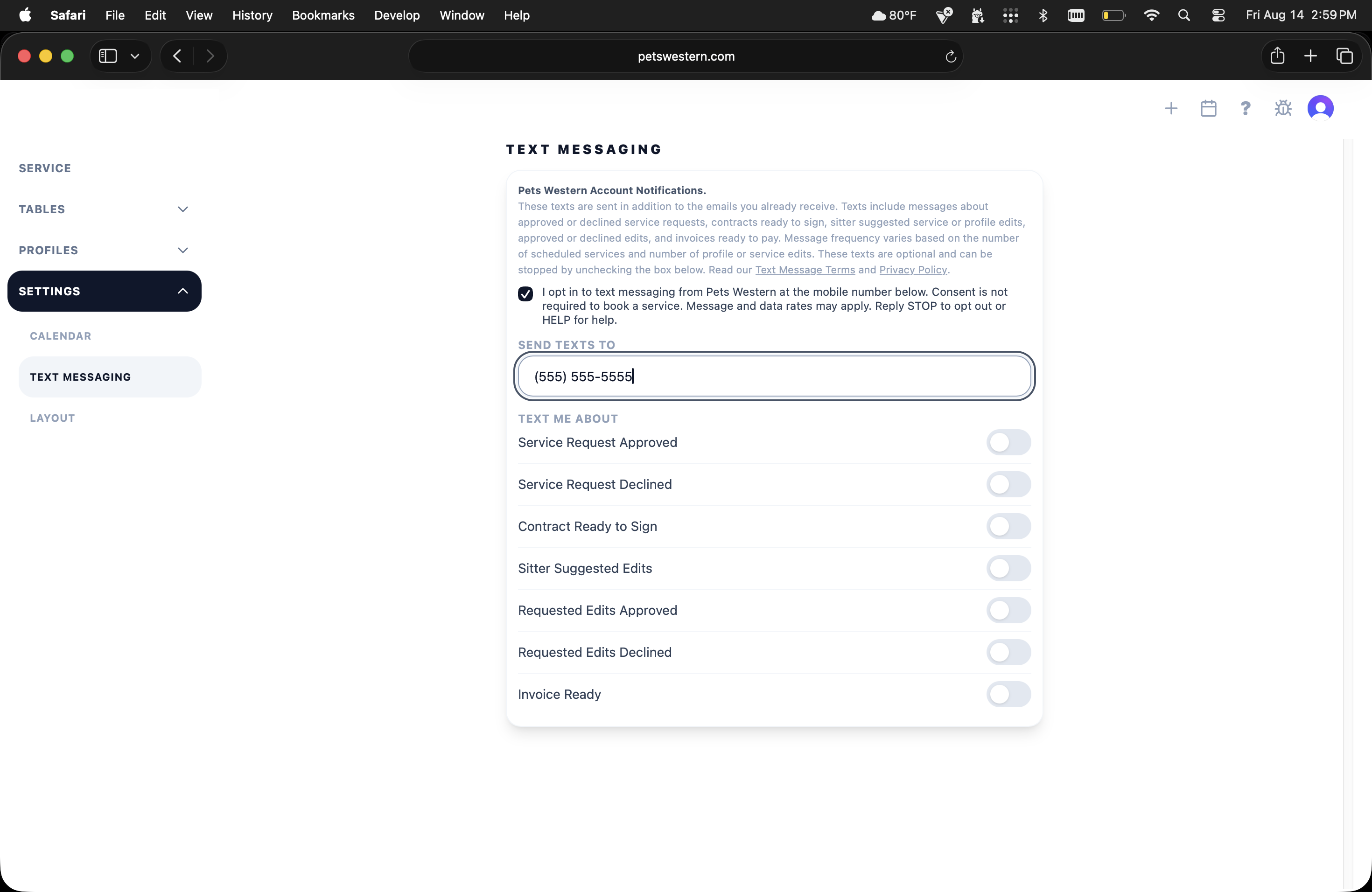
Step 4 - Switch on the events you want a text about. They appear only once the box is checked and a number entered, and every one of them starts off; nothing is sent until at least one is switched on.
The date and time you give consent is recorded against that number. Changing the number records a new consent; UNCHECKING THE BOX withdraws consent and deletes the record of it, and no further messages are sent.
Pets Western Account Notifications.These texts are sent in addition to the emails you already receive. Texts include messages about approved or declined service requests, contracts ready to sign, sitter suggested service or profile edits, approved or declined edits, and invoices ready to pay. Message frequency varies based on the number of scheduled services and number of profile or service edits. These texts are optional and can be stopped by unchecking the box below. Read our Text Message Terms and Privacy Policy.
Send texts to
Text me about
Illustration of the live form - not interactive
How the Pets Western Ltd. owner opts in
This section is for the Pets Western Ltd. owner. Pet owners can skip it - none of these switches appear in a pet owner’s account.
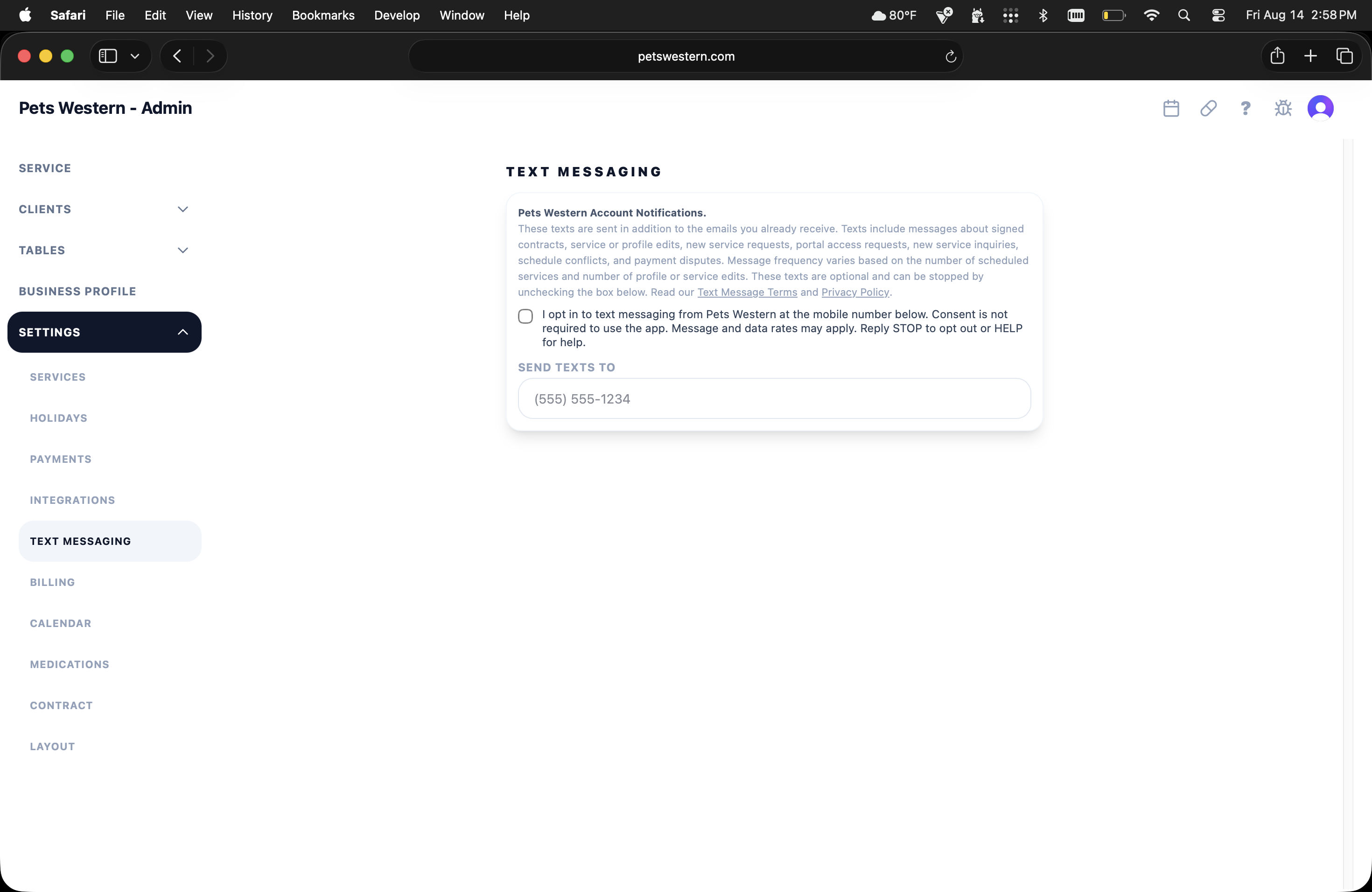
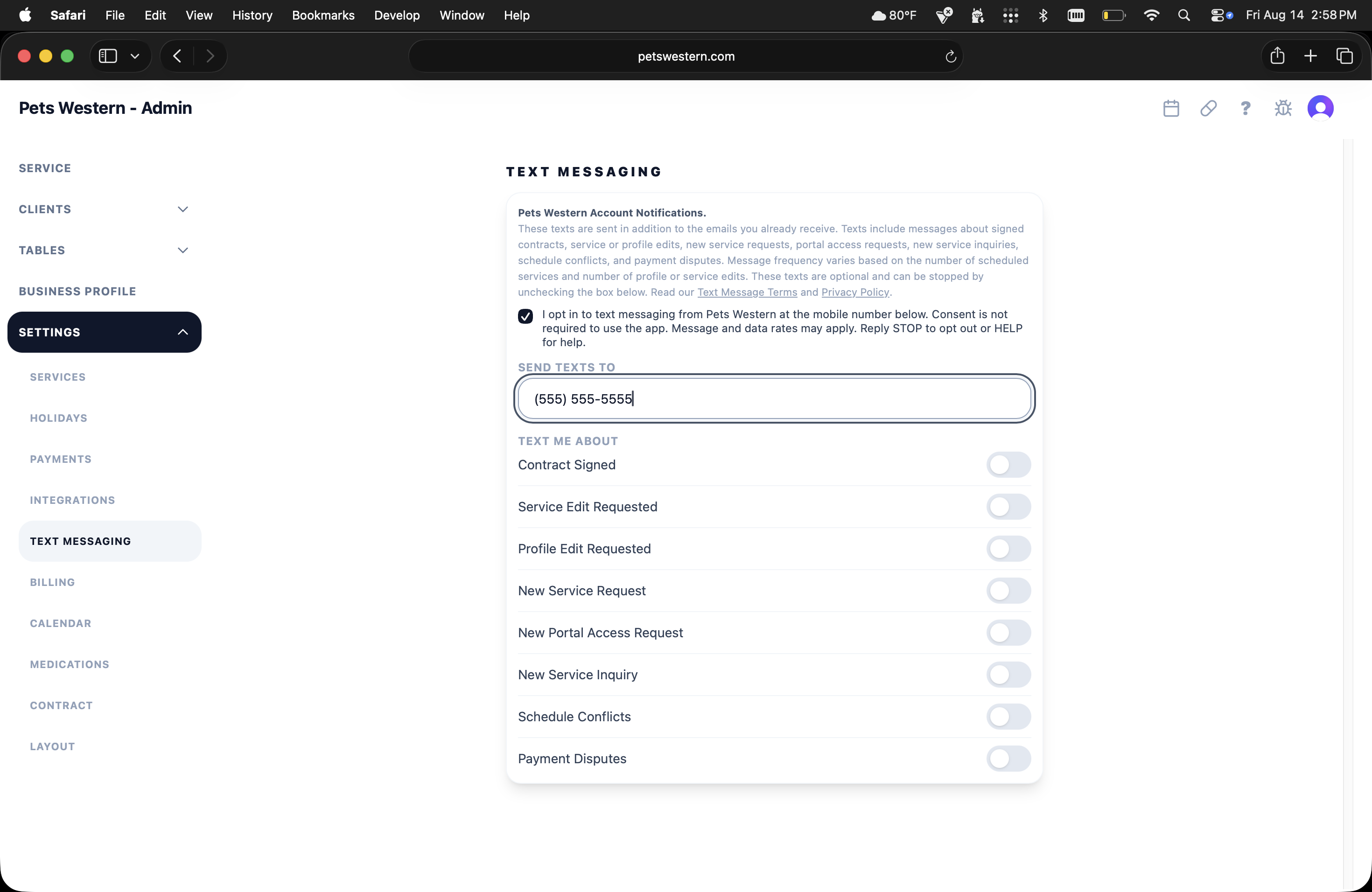
Pets Western Account Notifications. Texts include messages about signed contracts, service or profile edits, new service requests, portal access requests, new service inquiries, schedule conflicts, and payment disputes.
Sign in, open Settings then Text Messaging, read the disclosure, check the opt-in box - it is empty by default - and type your own mobile number into Send texts to, then switch on the events you want a text about. Opting out works exactly as it does for pet owners: reply STOP, or uncheck the box.
Pets Western Account Notifications.These texts are sent in addition to the emails you already receive. Texts include messages about signed contracts, service or profile edits, new service requests, portal access requests, new service inquiries, schedule conflicts, and payment disputes. Message frequency varies based on the number of scheduled services and number of profile or service edits. These texts are optional and can be stopped by unchecking the box below. Read our Text Message Terms and Privacy Policy.
Send texts to
Text me about
Illustration of the live form - not interactive
Common to both
Messages go only to the person who entered the number - a pet owner receives messages about their own bookings, the business owner receives messages about activity in the business. Pets Western Ltd. does not send marketing or promotional messages, and never texts a number that somebody else has provided. Consent is a box you check yourself - it is never checked in advance, and entering a number alone does not opt you in. There is no public sign-up: a number can only be entered from inside the account it belongs to.
How often
Message frequency varies with how busy your account is. A message is sent when one of the events you have switched on actually happens, so a quiet week may produce none.
One message repeats. If a service agreement is waiting for your signature, a reminder is re-sent every few days until you sign it. Sign it, or switch off “Contract ready to sign”, and the reminders stop. Nothing else in either program repeats.
What the messages look like
A pet owner receives messages like these:
Pets Western: your contract for Full-Time Care is ready to sign: https://petswestern.com Reply STOP to opt out.
Pets Western: your invoice for Full-Time Care is ready - $420. Pay: https://petswestern.com Reply STOP to opt out.
The invoice message ends by telling the client how to pay, which depends on the payment methods the business accepts. That closing sentence is one of these:
- Pay: https://petswestern.com
- You will receive a Zelle request.
- You will receive a Venmo request.
- You will receive a Cash App request.
- You will receive a PayPal invoice.
- Please send a check to Pets Western.
- Please pay Pets Western directly.
- Details: https://petswestern.com
The Pets Western Ltd. owner receives messages like these:
Pets Western: New service request from Jane Smith: Full-Time Care, 09/01/2026 - 09/03/2026. Approve it: https://petswestern.com Reply STOP to opt out.
Pets Western: New portal access request from Jane Smith. Approve it: https://petswestern.com Reply STOP to opt out.
Cost
Pets Western Ltd. does not charge for these messages. Message and data rates may apply from your own mobile carrier, depending on your plan.
How to stop
Reply STOP to any message and Pets Western Ltd. will stop sending them to that number. You will receive one confirmation and nothing after it. STOPALL, UNSUBSCRIBE, CANCEL, END, QUIT, REVOKE and OPTOUT do the same thing.
You can also uncheck the consent box in your text messages settings, which stops all messages, or you can switch off any individual event.
To start again after replying STOP, reply START, or check the consent box again in your account settings.
How to get help
Reply HELP to any message for support information, or email Pets Western Ltd. at hello@petswestern.com.
Delivery
Pets Western Ltd. cannot guarantee that every message arrives. Delivery depends on your carrier and your device, and neither is under its control. Do not rely on a text message as your only notice of anything time-critical - the same information is always in your dashboard, and the important events are emailed as well.
Your number
The number you give Pets Western Ltd. is used only to send you these messages. It is never shared with third parties or sold, and is never used for marketing. It is passed only to the messaging provider for the purpose of delivering your messages. See the privacy policy.
Changes
If these terms change, the date at the top changes with them.
Contact
© 2026 Pets Western